
RouteSketcher vs RouteDoodle: Which GPS Art App Should You Use?
Short answer: RouteDoodle is completely free and has the most tools for planning the ride itself: turn-by-turn directions, time estimates, elevation and lots of file formats. RouteSketcher costs $19.99 once and is built for the creative side: AI shapes, routes that write words, social reels, a public gallery and your sketches saved to an account.
We make RouteSketcher, so we're not neutral. That's why we checked every RouteDoodle fact below on routedoodle.com on 16 October 2026, and we say plainly where RouteDoodle is better.
Quick Overview
| RouteSketcher | RouteDoodle | |
|---|---|---|
| Price | 2 free sketches, then $19.99 once | Free, all features |
| Account | Needed, sketches sync across devices | Not needed, drawings stay in your browser |
| Drawing | Freehand, snaps to roads as you draw | Pencil and wireframe, the route follows live |
| Start from an idea | AI doodles, text to route, image import | Picture search, image tracing, SVG |
| Turn-by-turn directions | ❌ No | ✅ Yes, with time estimate |
| Export | GPX, PNG overlay, reels | GPX, TCX, FIT, KML, CSV, picture, video |
| Import | GPX, including recorded activities | GPX, TCX and FIT, including recorded rides |
| Off-road freehand | ✅ Freestyle mode for parks and fields | ❌ No |
| Public gallery | ✅ Browse, like and clone | ❌ No |
Price: Free vs One-Time
RouteDoodle
RouteDoodle is 100% free: no signup, no ads, no paid version. Karl Chen built it in 2023 to make his own GPS art, and it costs little enough to run that it doesn't need to make money. That's a genuinely great deal, and it's the biggest reason people pick it.
RouteSketcher
- Free: 2 sketches, AI doodles, GPX import and export, PNG overlays and free reels
- Lifetime: $19.99 once, with unlimited sketches, editing saved sketches, publishing to the gallery and every reel option
The Bottom Line: On price, RouteDoodle wins, full stop. RouteSketcher is for when the extras below are worth $19.99 to you.
Drawing a Route
Both apps let you draw on the map and watch the route follow real roads while you draw. They just think about it differently.
RouteSketcher
You draw freehand and your line snaps to roads and paths as you go, like a pen that knows where the streets are.
- Snapping mode for streets, Freestyle mode for parks, beaches and fields
- Freestyle draws straight across open ground, which RouteDoodle can't do
- Move, scale and rotate the whole sketch
- Edit single points, undo and redo
- Snapping steers around lakes, rail yards and buildings
RouteDoodle
You draw a blue wireframe with the Pencil, and RouteDoodle draws a red route along the roads that follows it.
- Bike, Run and Bird routing modes
- Lasso part of a drawing and move, resize or rotate just that part
- Split a line into pieces and join them back up
- A Roads layer made for GPS art, and Barriers that show where you can't cross
The Bottom Line: RouteDoodle has more fine-grained editing tools. RouteSketcher is quicker when you just want to draw a shape and see it on the streets, and it's the one to use in a park or a field.
Starting From an Idea
This is where the two apps differ most.
RouteSketcher: AI and Text
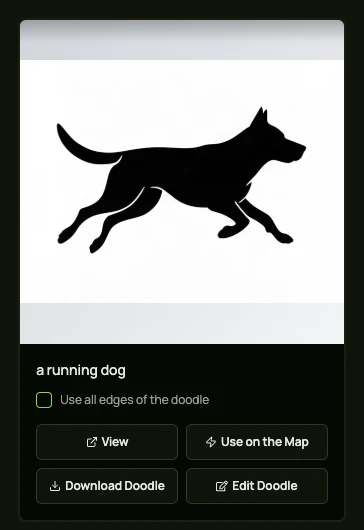
- AI doodles: type "a running dog" and get a clean shape to put on the map. How AI prompts work
- Sketch clean-up: draw something rough and AI tidies it up. Transform a sketch with AI
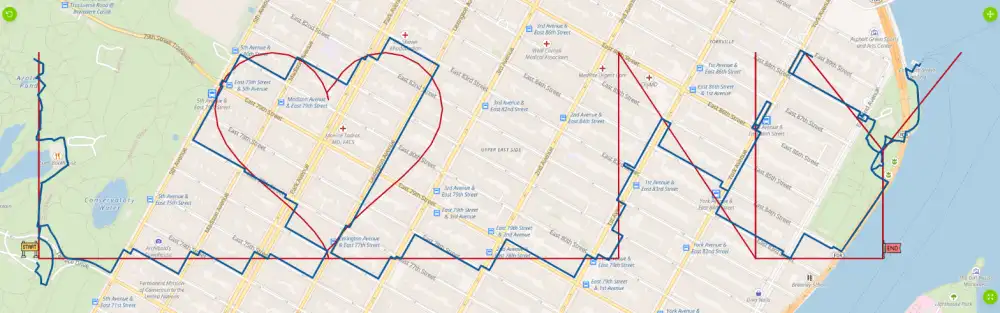
- Text to Sketch: type a name or a word, pick a font, and get one continuous route that writes it, like the I ♥ NY above. Write a word with your run
- Image import: upload a picture and turn it into a sketch
RouteDoodle: Pictures
- Picture search: type "dragon" and pick a picture to trace
- Automatic tracing: drop in any picture and it becomes a wireframe
- SVG import: keeps a drawing's own lines, inside ones too
RouteDoodle's own comparison confirms it has no generative AI and no way to turn words into a drawing.
The Bottom Line: If you have a picture, both work well. If you only have an idea or a word, RouteSketcher gets you there.
Planning the Actual Run or Ride
RouteDoodle is clearly ahead here.
- RouteDoodle: turn-by-turn directions, an estimated time that accounts for all the turns, an elevation chart and a Comfort score for how pleasant the route is
- RouteSketcher: shows the distance, and leaves turn-by-turn navigation to your watch or app (Garmin, Komoot, Strava, Google Maps)
The Bottom Line: If you want to study every turn before you leave, use RouteDoodle.
Export and Import
RouteSketcher
- Export: GPX for any watch, bike computer or app. Guides for Garmin and Google Maps
- Import: load a GPX file from Strava, Garmin or Komoot and rework it. Import a GPX file
- Overlay: a transparent PNG of your route for Strava screenshots and Stories
RouteDoodle
- Export: GPX, TCX and FIT (with directions), KML for Google Earth, a CSV of directions, and a picture with or without the map
- Import: GPX, TCX and FIT files, including rides you already recorded
The Bottom Line: RouteDoodle handles more file formats, both in and out. Both let you bring an existing route in and rework it.
Videos for Social Media
Both apps can make a video of your route.
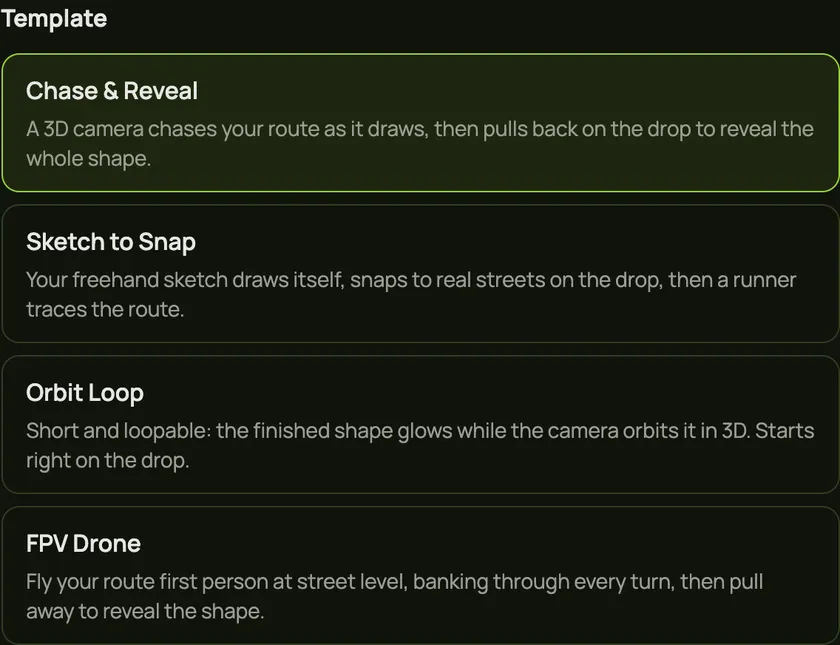
- RouteSketcher: reels made for Instagram and TikTok, with templates like Chase & Reveal, Sketch to Snap, Orbit Loop and FPV Drone, plus music. Free reels use one style; Lifetime unlocks every color, size and a day or night map. Create a flyover reel
- RouteDoodle: a video of your route
The Bottom Line: If you post your GPS art, RouteSketcher's reels are built for exactly that.
Saving, Sharing and Community
- RouteSketcher saves your sketches to your account, so they're on every device you sign in on. Lifetime users can publish to the public GPS art gallery, where anyone can browse, like and clone a design as a starting point.
- RouteDoodle saves drawings in your browser on that device, and can share a link that opens your doodle, ready for someone else to edit and export. There's no public gallery.
Feature Comparison Summary
| Feature | RouteSketcher | RouteDoodle |
|---|---|---|
| Free to use | ⚠️ 2 free sketches | ✅ Everything |
| No signup | ❌ Account needed | ✅ Yes |
| Live routing while drawing | ✅ Yes | ✅ Yes |
| AI shapes from a prompt | ✅ Yes | ❌ No |
| Routes that write words | ✅ Text to Sketch | ❌ No |
| Picture tracing | ✅ Image import | ✅ With picture search |
| Turn-by-turn directions | ❌ No | ✅ Yes |
| Elevation and time estimate | ❌ No | ✅ Yes |
| GPX export | ✅ Yes | ✅ Yes |
| TCX, FIT, KML export | ❌ No | ✅ Yes |
| GPX import | ✅ Yes | ✅ Yes, plus TCX and FIT |
| Freehand off-road | ✅ Freestyle mode | ❌ No |
| Social reels | ✅ Free and Lifetime | ⚠️ Route video |
| Sync across devices | ✅ Yes | ❌ Saved per browser |
| Public gallery | ✅ Browse, like, clone | ❌ No |
Which Should You Choose?
Choose RouteDoodle if you:
- Want everything free, with no account
- Care most about planning the ride: directions, time, elevation
- Need TCX or FIT files for your bike computer
Choose RouteSketcher if you:
- Start from an idea, not a picture, and want AI to draw it
- Want to write a word or a name with your run
- Want to draw across a park or a field, off the roads
- Post your art and want reels for Instagram and TikTok
- Like browsing and cloning community designs
- Want your sketches on every device
Or use both
They work together. Design a shape in RouteDoodle, export it as a GPX file, then import it into RouteSketcher to tweak it, make a reel or publish it to the gallery.
Frequently Asked Questions
Is RouteDoodle free? Yes. Every feature is free, with no signup, no ads and no paid version.
Is RouteSketcher free? You get 2 free sketches, AI doodles and free reels. Unlimited sketching is a one-time $19.99, not a subscription.
Can RouteDoodle make GPS art with AI? Not with generative AI. It can search for a picture and trace it. RouteSketcher can generate a shape from a text prompt or turn words into a route.
Which app is better for Strava art? Both export GPX files that Strava, Garmin and Komoot accept. Pick RouteDoodle for ride planning and price, RouteSketcher for AI shapes, text routes and reels. New to it? Start with our guide to Strava art.
Getting Started with RouteSketcher
- Sign up for free at routesketcher.com/signup
- Open the editor and pick Snapping for city routes
- Draw your shape, or type a prompt in the AI doodle generator
- Export a GPX file for your watch, then make a reel to share it
Also comparing other tools? Read RouteSketcher vs GPSArtify.
Last checked: 16 October 2026. RouteDoodle facts come from routedoodle.com, its help pages and its own comparison table on that date. Features and prices change, so check both sites for the latest.